Are you wondering what the photo georeferencing “feature” in Mac OS X 10.5 Leopard is like? Find a photo that has latitude and longitude already encoded in its EXIF metadata. Open it with the Preview Application, turn on the inspector, and voila, under the “More Info” tab you get the metadata above a small world map:
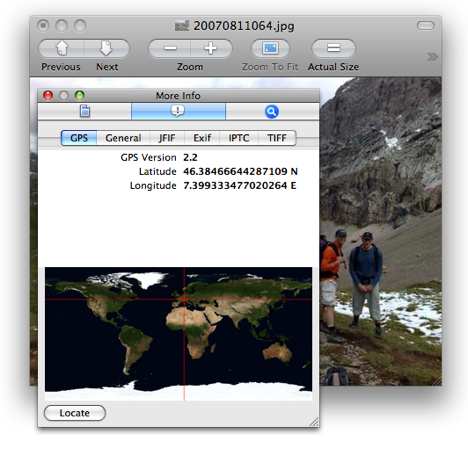
You can’t edit the GPS data, and the built-in map is about as rudimentary as you can get, but the Locate button takes you directly to the view in Google Maps in your web browser. That’s a smart bit of outsourcing, but it’s not as if the third-party photo georeferencing tools currently running on the Mac are in any danger of being outpaced by the operating system. And it’s also a bit curious that neither iPhoto nor Aperture have a built-in mapping solution in a time when photogeoreferencing has gone mainstream. HoudahGeo, GPS Photo Linker, Geotagger, PhotoInfo and LoadMyTracks have nothing to worry about.
I was quite disappointed by the georeferencing in Leopard. I guess Apple didn’t want to rely on Google too much, incase Google change their feature set/interface. Great. More users for me :-)
Actually, I think this is more of a queued carry-over from the Adobe users, and Adobe’s XMP metadata schema. So, I don’t really view it as anything unique or that I haven’t seen in the media / design / photography world. It just appears to make sense to accomodate that user-base with an OS provisioned method that gels well within that sector (since that’s the core of their user-base.)
More of a ‘media’ thing, in my perspective — to put it short.
And — to elaborate a little, it appears more relative to the consumer camera market’s boost in integrating GPS locating for photography that’s probably driving that inclusion into the Leopard interface.
You can also tag your photos with on a Mac using PhotoInfoEditor and PhotoGPSEditor from MMISoftware.
Um, Apple, that’s quite stingy of you. Take a hint from Panoramio (i.e. image was taken xx km from city, country).
With that little map, you can’t even see the country the photo was taken.
That’s a whole lot of decimal places in the GPS data. So it’s accurate to a nanometer? ;-)
What is curious to me is that the GPS metadata tag says version 2.2
I wonder where v.1.x was hanging out all this time in the OS (if at all)?
The 2.2 is referring to the format of how the GPS data, and all Exif data, is stored within the jpeg. It is not Apple’s version 2.2 of reading the data.
(http://en.wikipedia.org/wiki/Exif)
Ahh-hah..Thanks Craig for clarifying! This explains it.
Why don’t you try digiKam on Leopard? It should run via Fink and has all the geo features you want, and has most of Apertures features as well, for free -> http://www.digikam.org
manuals to get HoudahGeo, GPS Photo Linker, Geotagger, PhotoInfo and LoadMyTracks working with the Mac OS X 10.5 Leopard can be found at Wiki learning
Nice advantages of the tools are the tracking utility so you can see the path you walked. I guess within 10 years, we can see 3d pictures made up from many people making photographs synchronized through GPS. Wow, technology is moving on! Awesome
Only in us order levitra with the discount today! Convenient system of payment + home delivery! Hurry
up! Lowest Prices on the web and a system of discounts!!! Only FDA Approved pills!
http://forums.ipodhacks.com/showthread.php?p=64968 discount levitra online
http://archive.nlm.nih.gov/vaforum/read.php?5,6 viagra cialis levitra
http://archive.nlm.nih.gov/vaforum/read.php?5,7 buy cheap levitra
http://moodle.acnt.edu.au/user/view.php?id=1762&course=1 levitra order online
The 2.2 is referring to the format of how the GPS data, and all Exif data, is stored within the jpeg. It is not Apple’s version 2.2 of reading the data.
Gerhard,
Would love to get digiKam running on OS X, but I can’t locate any Mac distros and have had loads of problems trying to get cmake to a state where it will try to compile the source code.
Sounds like you’ve already solved this! Any hints?
Interesting feature. Someone know how you can access geo data using a windows application?